Banner 468

pardon hackers
Facebook
RSS
Showing posts with label basics. Show all posts

skiping ads

 Skip or bypass Rapidshare, Megaupload Waiting time

Yes, you are reading it correctly, its not a prank or joke, now you can easily avoid the waiting time or usually we say time limit when you download as a free user from the file sharing services such as rapidshare, megaupload, deposifiles, hotfile. Normally you have to wait for 20-60 minutes to download the second file after downloading the first one. They implement ways to invite users to purchase a premium service. But this way of limiting Free download limit and asking free users to wait for long time to start another download can be annoying one.


Skipscreen is an extension to browser to by pass waiting time on download. Unfortunately it can only be used with Firefox browsers to avoid waiting time while downloading files from some popular File hosting services like:
* Rapidshare.com
* zShare.net
* MediaFire.com
* Megaupload.com
* Sharebee.com
* Depositfiles.com
* Sendspace.com
* Divshare.com
* Linkbucks.com
* Uploaded.to
* Hotfiles.com
* 4shared.com
* Limelinx.com
* Link-Protector.com
Its use is very simple and does not require any configuration, just go to the addon page of the extension and install it, restart your browser and enter one of thesedownload sites and you will no longer have to wait.
Download Skip ----Screen Firefox Extention

Alternative Methods or Hacks to Beat Rapidshare Download Limits and Waiting Time
Method 1:  Using Java Script:
1. Goto the page you want to download
2. Select FREE button
3. In the address bar put the following: javascript:alert(c=0)
4. Click OK
5. Click OK to the pop-up box
6. Enter the captcha
7. Download Your File
Method 2:  Request a new IP address from your ISP server
Here’s how to do it in windows:
1. Click Start
2. Click run
3. In the run box type cmd.exe and click OK
4. When the command prompt opens type the following.
ENTER after each new line.
ipconfig /flushdns
ipconfig /release
ipconfig /renew
exit
Note: This might only work for DSL/Modem Internet Connection, not for Cable Internet users

2). Skipping or Bypassing Rapidshare or Megaupload, hotfile waiting time.

In this post I have a new Rapidshare hacking tip for you. Well, you might be aware of Browsers like Firefox, or Internet Explorer. I would like to introduce you to a browser known as Torpark Browser, which works as a anonymous web browser. It is like a proxy browser where you can change your permanent IP Address  to dynamic IP Address. So, when ever you run this browser you get a new IP address.  Now download mutliple files at the same time. Yes you read it right, you can download multiple rapidshare files or megaupload, hotfile files at the same time. You can even skip or bypass the time limit on downloading files. The most amazing thing is IDM works with this browser.


DOWNLOAD
Note: You need to close the browser window after each download coz it will reset the ip address.
[ Read More ]

rocovering hacked Email


How to Recover Hacked Email Accounts?

Email Hacked?
It can be a real nightmare if someone hacks and takes control of your email account as it may contain confidential information like bank logins, credit card details and other sensitive data. If you are one such Internet user whose email account has been compromised, then this post will surely help you out. In this post you will find the possible ways and procedures to get back your hacked email account.

For Gmail:

It can be a big disaster if your Gmail account has been compromised as it may be associated with several services like Blogger, Analytics, Adwords, Adsense, Orkut etc. Losing access to your Gmail account means losing access to all the services associated it with too. Here is a list of possible recovery actions that you can try.
Step -1: Try resetting your password since it is the easiest way to get your account back in action. In this process Google may ask you to answer the secret question or may send the password reset details to the secondary email address associated with your compromised account. You can reset you password from the following link
If you cannot find success from the Step-1 then proceed to Step-2.
Step-2: Many times the hacker will change the secret question and secondary email address right after the account is compromised. This is the reason for the Password Reset process to fail. If this is the case then you need to contact the Gmail support team by filling out the account recovery form. This form will ask you to fill out several questions like
1. Email addresses of up to five frequently emailed contacts
2. Names of any 4 Labels that you may have created in your account
3. List of other services associated with your compromised account
4. Your last successful login date
5. Account created date
6. Last password that you remember and many more…

You need to fill out this form as much accurately as possible. It is obvious to forget the dates of last login, account creation and similar terms. However you need to figure out the closest possible date/answers and fill out this form. This is your last chance! The more accurate the information filled out in the recovery form, the more the chances of getting your account back. You may reach the account recovery page form the following link

For Yahoo and Hotmail:

Unfortunately for Yahoo/Hotmail there is no second option like filling out the form or contacting the support team. All you need to do is either answer the secret questions that you have setup or reset the password using the secondary email option. 
To initiate the password reset process just click on the Forgot password link in your login page and proceed as per the screen instructions.
I hope this post will help you recover the lost account. I highly recommend that you also read my post on How to protect your email account from being hacked and Tips to find unauthorized activity on your Gmail account so that you always stay protected!
[ Read More ]

Email tracking(ip)

Hai this post is for noobs if you are a daemon ignore it!!!
Tracing mails you recieve
                    If you have any abusive mails or if you want to trace victims IP address or if you want to know whether your friend has read your mail then this will help you
Here it goes:
                    You can trace the email received by analyzing the header actually this could be done manually ,but i wont be recommending that becoz there are tools which make life easier follow the steps
1.open the email header (you can find the header by clicking show original option in gmail)
2.copy the header and paste in below mentioned tools
Recommended tools:
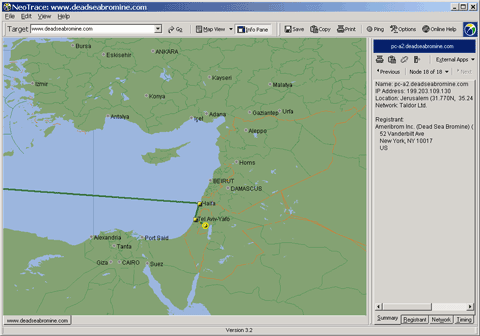
Utility name: Neo Trace Pro
Fantastic tool top recommended this will geographically trace your ip address .It is very accurate and has extremely useful functionalities.
Download from here
utility name: VisualRoute , Download from here
utility name: eMailTrackerPro , Download from here
Tracing the mails that you send
                Most of you find fun in this bcoz the tool i'm gonna explain will send you information when the victim opens it.All you need to do is visit spypig.com enter the required fields then it will give you a image which has to be sent to your victim. the tool looks like this
Step 1: Specify the email id to which you want to get the Destination's ip
Step 2: Here goes your message title
Step 3: Select the image you want to send , you may upload your own image too but its recommended to select the first one(white) becoz it will mix up with white background of your mail body so some one looking at this will think that there is no image
Step 4: Press the create button 
Step 5:Here the tricky part comes copy your image into your mail body within in the time limit shown by spy pig or else it will expire
Note : Use the New gmail version bcoz in older one you cant copy a image into body
Step 6: this step says you to send the mail

                    Hopefully if the victim opens the mail you will receive all the information of victim like OS,browser,ip & mac address
Note : there is no counter measure for this
HAPPY HACKING ;]
[ Read More ]

google unofficial shell account


This google-interface behaves similar to a unix-shell.
You type commands and the results are shown on this page.


goosh is powered by google. 

goosh is written by Stefan Grothkopp <grothkopp@gmail.com> 
it is NOT an official google product!
goosh is open source under the Artistic License/GPL.

Click here to see.
[ Read More ]

Phishing awareness


Phishing is a form of social engineering technique used by hackers to gather sensitive information such as usernames, passwords and credit card details by posing as a trustworty person/organization. Since most online users are unaware of the techniques used in carrying out a phishing attack, they often fall victims and hence, phishing can be very effective.
With the dramatic increase in the number of phishing scams in the recent years, there has also been a steady rise in the number of people being victimized. Lack of awareness among the people is the prime reason behind such attacks. This article will try to create awareness and educate the users about such online scams and frauds.
Phishing scams usually sends an email message to users requesting for their personal information, or redirects them to a website where they are required to enter thier personal information. Here are some of the tips that can be used to identify various phishing techniques and stay away from it.
Identifying a Phishing Scam 1. Beware of emails that demand for an urgent response from your side. Some of the examples are:
1. You may receive an email which appears to have come from your bank or financial organization stating that “your bank account is limited due to an unauthorized activity. Please verify your account asap so as to avoid permanant suspension”. In most cases, you are requested to follow a link (URL) that takes you to spoofed webpage (similar to your bank website) and enter your login details over there.In some cases, phishing emails may ask you to make a phone call. There may be a person or an audio response waiting on the other side of the phone to take away your credit cards details, account number, social security number or other valuable data.
2. Phishing emails are generally not personalized. Since they target a lagre number of online users, they usually use generalized texts like “Dear valued customer”, “Dear Paypal user” etc. to address you. However, some phishing emails can be an exception to this rule.
3. When you click on the links contained in a phishing email, you will most likely be taken to a spoofed webpage with official logos and information that looks exactly same as that of the original webpages of your bank or financial organization. Pay attention to the URL of a website before you enter any of your personal information over there. Even though malicious websites look identical to the legitimate site, it often uses a different domain or variation in the spelling. For example, instead of paypal.com, a phishing website may use different addresses such as:
papyal.compaypal.orgverify-paypal.comxyz.com/paypal/verify-account/  Tips to Avoid Being a Victim of Phishing
1. Do not respond to suspicious emails that ask you to give your personal information. If you are unsure whether an email request is legitimate, verify the same by calling the respective bank/company. Always use the telephone numbers printed on your bank records or statements and not those mentioned in the suspicious email.
2. Don’t use the links in an email, instant messenger or chat conversation to enter a website. Instead, always type the URL of the website on your browser’s address bar to get into a website.
3. Legitimate websites always use a secure connection (https://) on those pages which are intended to gather sensitive data such as usernames and passwords, account numbers or credic card details. You will see a lock icon
awareness is best avoidance for phishing

related video:
http://www.google.co.in/url?sa=t&source=web&cd=6&ved=0CDsQtwIwBQ&url=http%3A%2F%2Fwww.youtube.com%2Fwatch%3Fv%3D7MtYVSGe1ME&ei=xpqITriWKuO1iQfU3_GZDw&usg=AFQjCNE8ywT5JHw5Qe1NJnHHPAtDJ6fIkw
[ Read More ]